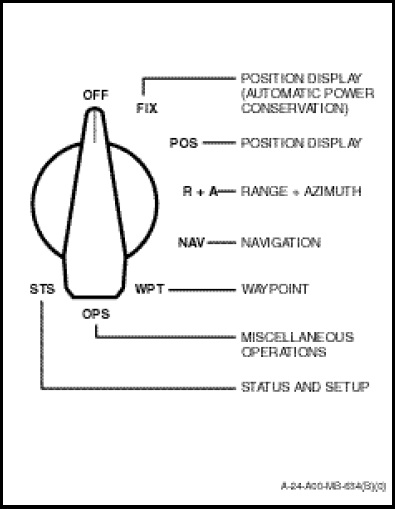
The Trimpack consists of the necessary hardware and software required for satellite signal processing and solution computation. The Trimpack has a four line, 20 column Liquid Crystal Display (LCD) with characters displayed on a five by seven dot matrix. The system is operated utilizing three controls; an eight-position mode selection rotary switch, a LR (left-right) switch and an INC-DEC (increment-decrement) switch.
a. The eight-position rotary switch (Figure 1-11-23) is used to turn the Trimpack ON and OFF, as well as access the various operational modes. To select the type of operation the system will perform, rotate the switch to;
(1) OFF. System powers down after 15 second delay.
(2) FIX. Same as POS but saves power by powering down after 30 seconds if position fixes are in progress. If position fixes are not in progress, up to 5 minutes are allowed to obtain a fix before powering down. During the last 30 seconds, a countdown message is shown at the top of the screen.
(3) POS. Displays the most recent position fix.
(4) R+A. Shows range, azimuth, and vertical distance to three separate, selectable waypoints simultaneously.
(5) WPT. Edit or define 26 waypoints designated A – Z.
(6) NAV. Displays position data to help navigate from present position to another position. One of four navigation screens are available.
(7) OPS. Provides additional functions for manipulating waypoints or controlling the Trimpack.
(8) STS. Provides operating status information and allows setting up display options.
NOTE
The NAV and OPS positions have four selectable screens; the STS position has three; all other positions have a single screen.
b. L-R Switch. The centre-biased three-position L-R switch is used to select among the various user-alterable fields of the display. This function allows for field selection and cursor positioning only; it does not change the value of any displayed data. This switch also incorporates an auto-repeat function which is activated when the switch is held in either position. This will cause the cursor to sequence through the available screen fields continuously until the switch is released.
c. INC-DEC Switch. This centre-biased, threeposition switch is used to alter values, select options, or change screens in the selected field. If the selected field is a data field, this switch will sequence through numeric or alphabetic characters for selection. If the selected field requires an option selection, the switch will sequence through the available options. If the selected field is the <more> field (lower right corner of a display – if any), the switch will page through the additional screens associated with that selection. This switch also has an auto-repeat characteristic. The rate of sequencing depends on the type of data. Large numeric fields will have sequencing at approximately 10 steps/second; whereas, alphabetic characters and other single digit fields will sequence at approximately four steps/second.
NOTE
When a user-alterable field has been selected, use of the INC-DEC switch will change the value of the stored data. Ensure that the field selection has been made properly before using this switch.
Display Fields. The display screen provides information in various formats depending on the display mode chosen. Some screens have fields in which the user can change the displayed value or select options. These fields are called user-alterable fields and are depicted on the actual GPS display screen by a flashing box. These are the fields (and cursor positions within the fields) which are accessed by using the L-R switch. Once a field has been selected, the INC-DEC switch is used to alter the field. This action depends on the type of field as described in the following sections:
a. Field Selection. When the L-R switch is used to select a user-alterable field, the field flashes. The field continues to flash until the cursor is moved to another field or 25 seconds elapse. After 25 seconds, the field selection deactivates, and the L-R switch shall be used to reactivate the field. The data in a useralterable field can be changed by using the INC-DEC switch only while the field is flashing.
b. Next Display Selection. The NAV (Navigation), OPS (Miscellaneous Operations) and STS (Status and Set-up) operating modes each contain multiple screens. The screens within each mode are linked by the <more> field. This field will flash for 25 seconds after you enter the screen, indicating that you can select the next or previous screen by pressing the INC or DEC switch. After 25 seconds, the screen selection deactivates; to move to another screen, use the L-R switch to move the cursor to the <more> field and then use the INC-DEC switch to move to the next (or previous) screen.
c. Data Entry. Data entry into the Trimpack is required in a variety of situations. Data entry is in the form of an alphanumeric character input such as waypoint definition and altitude values and/or the selection of user options such as datum, co-ordinate system and units to be used. Once a user-alterable field has been selected using the L-R switch, the field will flash for 25 seconds and data entry can be initiated. Alphanumerical character entry is done by first using the L-R switch to position the cursor to the desired position within the field. The INC-DEC switch is then used to scroll forward or backward through the available characters specific to the field in use. For example, an alphabetic field will only scroll through alphabetic characters. When the end of the sequence of valid characters or numbers is reached, the sequence will recycle to the beginning. When the switch is held in the INC or DEC position the sequence of data entry will scroll rapidly.